Smallest Font Size Button
Medium Font Size Button
Largest Font Size Button
 

Dynamic Keyboard

Jump to:
What is the Dynamic Keyboard?
The story behind the Dynamic Keyboard
Who is it for?
What devices does it work with?
Download Dynamic Keyboard
News
Acknowledgements and Contributors

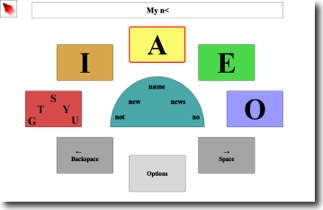
Screenshot of Dynamic Keyboard

What is the Dynamic Keyboard?

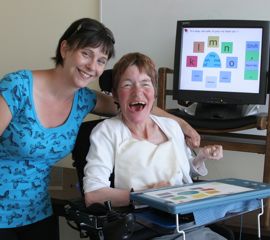
The Dynamic Keyboard is an on-screen keyboard which allows you to type using your computer and an input device such as a joystick, trackball, mouse, single switch, among others.

As you type, the Dynamic Keyboard also anticipates what you are trying to type and helps you choose the right letters and words faster. As you use the Dynamic Keyboard, it learns or remembers which words you tend to use and how you tend to type and, through this, will estimate your preferred choices in advance, thus helping to improve your typing speed.

You can use the Dynamic Keyboard to write into almost any program that accepts text on your computer, such as email programs or word processors.

The story behind the Dynamic Keyboard

The Dynamic Keyboard was initially designed as a method of typing with another CanAssist assistive technology (i.e. our Eye Tracking System). With eye tracking systems, users move the mouse cursor by looking at where they want the cursor to go on the screen. However, the effectiveness of these systems is decreased if there are too many on-screen targets for the user to choose from, or concentrate on (i.e. leads quickly to user fatigue). Therefore, a smaller number of interface items (similar to as portrayed in our Dynamic Keyboard interface) leads to more effective results.

Since those early days as an eye tracking interface, the Dynamic Keyboard has evolved to:

  • Work with many different input devices, from the IntelliKeys by IntelliTools(R), single switches of all kinds, as well as joysticks, mice, and trackballs.
  • Include statistical predictive typing algorithms.

From the beginning, we have worked directly with many people with disabilities to continually test and improve this technology.

Who is it for?

The Dynamic Keyboard is for people who would like to type on a computer but do not have the fine motor control to use a regular keyboard or regular on-screen (full) keyboard. It is designed with large easy to hit buttons, and large letters that are easy to see. These features are especially useful for people using less accurate devices like a head mouse or eye tracking system to control their mouse cursor.

What devices does it work with?

The Dynamic Keyboard has been designed to work with a variety of input devices.  These include:

  • Standard computer mice
  • Specialized joysticks and trackballs such as those produced by Penny Giles(R)
  • Head mice such as the SmartNav by Naturalpoint
  • Eye tracking systems
  • IntelliKeys(R) with the Dynamic Keyboard overlay (included in the download)

  Download
Dynamic Keyboard

News

August 10, 2009.  Dynamic Keyboard 1.01

 Version 1.01 of the Dynamic Keyboard has been release.  This versions fixes an issue where the word completion does not work in certain situations, and includes a new compact layout for the IntelliKeys Keyboard.

May 21, 2009. Update For Dynamic Keyboard

The Dynamic Keyboard installation file has been updated to address a problem where voice output does not work on certain systems.  All users are encouraged to update to this release.

Dec 15, 2008. Initial Release of the Dynamic Keyboard!

CanAssist is proud to release Dynamic Keyboard 1.0.  This is the first public release of the Dynamic Keyboard, after extensive testing and refinement based on the feedback of users with disabilities.

Acknowledgements and Contributors

The first prototype of the Dynamic Keyboard (then called Box Speller) was created by David Marotto,  a CanAssist co-op student, during late 2005 – early 2006. The project was further developed and continues to be managed by Leo Spalteholz. More recent development has been through two co-op students: Matthew Guze and Caitlin Blank.

Throughout the development period, we have benefited greatly from the testing efforts of our volunteers.  CanAssist would, therefore, also like to thank April, Kathleen, Val, and Iian, as well as many others for their tremendous contribution to testing the Dynamic Keyboard.  We would also like to thank Chris Newcombe for conducting the scientific study on the Dynamic Keyboard.

CanAssist would especially like to thank Shaw Communications for supporting the development of the Dynamic Keyboard.